USB 3.0 Dual HDMI Docking Station for M1/M2 MacBook Pro/Air, Dell, HP, Microsoft Laptops
Key Takeaway
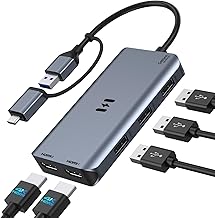
Transform your workspace with this USB 3.0 Docking Station, designed to extend your laptop's capabilities by connecting up to two HDMI monitors for a more productive dual display setup. Priced at just EUR57.50, it's perfect for professionals using M1 or M2 MacBook Pro/Air, as well as users of Microsoft, Dell, and HP laptops, allowing you to multitask efficiently and enhance your viewing experience. Upgrade your setup and enjoy seamless connectivity today!
Frequently Asked Questions
What is USB 3.0 Docking Station?
The USB 3.0 Docking Station is a versatile device that allows users to connect multiple peripherals to their laptops. It features dual HDMI outputs for extended displays, making it ideal for multitasking.
How much does USB 3.0 Docking Station cost?
The USB 3.0 Docking Station is priced at EUR 57.50. This price offers great value for users needing multiple display connections and enhanced productivity.
What are the key features of USB 3.0 Docking Station?
Key features of the USB 3.0 Docking Station include dual HDMI outputs for extended displays, compatibility with M1 and M2 MacBook Pro/Air, and support for various brands like Microsoft, Dell, and HP.
Who is USB 3.0 Docking Station best for?
The USB 3.0 Docking Station is best for professionals and students who require multiple monitors for enhanced productivity. It's particularly useful for users of MacBook Pro/Air and other compatible laptops.
How do I use/care for USB 3.0 Docking Station?
To use the USB 3.0 Docking Station, simply connect it to your laptop's USB-C port and plug in your HDMI cables. For care, ensure it is kept in a dry environment and avoid excessive force on the ports.
Checkout with Confidence
Payment Security Guaranteed
Return with Ease
Fast & Hassle-Free Process.
Reviews
Fast Delivery
Quick & reliable shipping
Secure Shopping
100% secure transactions
Great Prices
Competitive deals daily
Expert Support
Here to help you choose

![4 IN 1 Retractable Car Charger, [60% Smaller] 145W USB C Cigarette Lighter Adapter, Socket Splitter with Retractable Cable&USB-C/A Port, 12V/24V Fast Charging Car Phone Charger for iPhone 17 Pro Max](https://m.media-amazon.com/images/I/612jKHgUmpL._AC_UL320_.jpg)


