Maximize Your Workspace with the USB 3.0 Docking Station: A Comprehensive Review
Our Product Insight
In today’s fast-paced digital world, having the right tools can make all the difference in your productivity. The USB 3.0 Docking Station with dual HDMI support is designed to elevate your workspace, especially for users of M1 and M2 MacBook Pro/Air, as well as laptops from Microsoft, Dell, and HP. This docking station allows you to connect multiple monitors and devices seamlessly, creating an efficient and organized setup.Key Features
Dual HDMI Outputs
One of the standout features of this docking station is its dual HDMI outputs. This means you can connect two external monitors, allowing you to extend your display or mirror your screen. Whether you’re working on a presentation, editing videos, or multitasking with various applications, having that extra screen real estate can significantly enhance your workflow.USB 3.0 Connectivity
Equipped with USB 3.0 ports, this docking station ensures fast data transfer speeds. You can connect your external hard drives, flash drives, or other peripherals without worrying about lag. The USB 3.0 technology supports data transfer rates of up to 5 Gbps, making it ideal for transferring large files quickly.
Universal Compatibility
This docking station is designed with versatility in mind. It’s compatible with a wide range of devices, including M1 and M2 MacBook Pro/Air, as well as laptops from major brands like Microsoft, Dell, and HP. This means you can use it across different devices without any hassle, making it a great addition to your tech arsenal.
Compact and Portable Design
Another great aspect of this docking station is its compact design. It’s lightweight and easy to carry, making it perfect for professionals on the go. Whether you’re working from home, at a café, or traveling for business, you can easily pack it in your laptop bag without taking up too much space.
Who It's For
The USB 3.0 Docking Station is ideal for a variety of users: - Remote Workers: If you work from home or remotely, having a dual monitor setup can help you stay organized and efficient. This docking station allows you to connect your laptop to two monitors, making it easier to manage multiple tasks. - Students: For students who need to juggle between research, assignments, and online classes, this docking station can be a game-changer. The ability to extend your display can help you keep notes open while watching lectures or working on projects. - Creative Professionals: Graphic designers, video editors, and other creative professionals will appreciate the dual HDMI outputs for enhanced visual clarity and workspace. The extra screen can be a significant advantage when working on detailed projects.Pros and Considerations
Pros
- Easy Setup: Users often find that setting up the docking station is straightforward, with plug-and-play functionality that doesn’t require extensive technical knowledge. - Versatile Connectivity: With multiple USB ports and HDMI outputs, you can connect various devices simultaneously, reducing cable clutter on your desk. - Enhanced Productivity: The ability to extend your display can lead to improved productivity, as you can have multiple applications open and visible at once.Considerations
- Power Supply: Some users may find that the docking station requires an external power supply for optimal performance, which could be a consideration if you prefer a completely wireless setup.
- Limited Resolution: While the dual HDMI outputs are a great feature, it’s essential to check the maximum resolution supported to ensure it meets your needs, especially for high-definition tasks.
In conclusion, the USB 3.0 Docking Station is a valuable tool for anyone looking to enhance their workspace. With its dual HDMI outputs, fast USB 3.0 connectivity, and universal compatibility, it’s designed to meet the needs of a diverse range of users. Whether you’re a remote worker, student, or creative professional, this docking station can help you maximize your productivity and streamline your workflow. Check current price to see if it fits your needs and elevate your workspace today!
To enhance your audio setup alongside the USB 3.0 Docking Station, consider the VITALCO Jack 6.35mm Mono 1/4 Inch Male to RCA Phono Female Audio Adapter 2 Pack for seamless connectivity. If you're looking to connect your headphones to an amp, the MOSWAG 1/8 Male to 1/4 Female adapter (2 Pack) is a perfect choice with its gold-plated connectors. For those needing an extension, the VCE 3.5mm Female to Female Adapter offers a reliable solution for your audio needs. Pair your devices effortlessly using the J&D 3.5mm to RCA Cable, which provides a heavy-duty audio splitter for superior sound quality. Lastly, the Analog to Digital Audio Converter is an excellent addition to your workspace, allowing you to connect your RCA or 3.5mm jack devices to a soundbar for a cinematic audio experience. Check out the MOSWAG 1/8 Male to 1/4 Female adapter (2 Pack), 3.5mm to 6.35 Adapter, 3.5 mm to 1/4 Gold-plated Connector for Amp Adapter, Headphone, CD/DVD, Mp3, PC for great value. Check out the VCE 3.5mm Female to Female Adapter, TRRS 1/8 Inch Stereo Audio Jack, Gold Plated AUX Extension Connector 2 Pack for great value. Check out the J&D 3.5mm to RCA Cable, Aux to RCA Headphone Male to Male Jack Adapter, Gold Plated Copper Shell Heavy Duty 1/8 Stereo Audio Y Splitter Cord for Smart for great value. Check out the Analog to Digital Audio Converter RCA to Optical with Cable RCA L R or 3.5mm Jack to Toslink and Coaxial Adapter for Soundbar for great value.
🛍️ More Products You Might Like

MOSWAG USB to 3.5mm Jack Audio Adapter, USB to Audio Jack Ad
£7.99
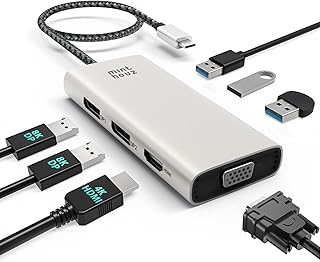
Minthouz USB C Docking Station, 7-IN-1 Multiport USB C Hub w
£29.99

MOSWAG USB to 3.5mm Jack Audio Adapter,External Sound Card U
£5.98

FINIBO 570W USB C Charging Station - 8 Port With 5 USB C and
£42.49

7.5V Roberts Ecologic 1 / Duologic DAB Radio replacement pow
£10.99
Disclaimer: This article has been generated through our AI content insight system and is intended for general informational purposes only. Please carry out your own research and review product details directly before making any purchase decisions.